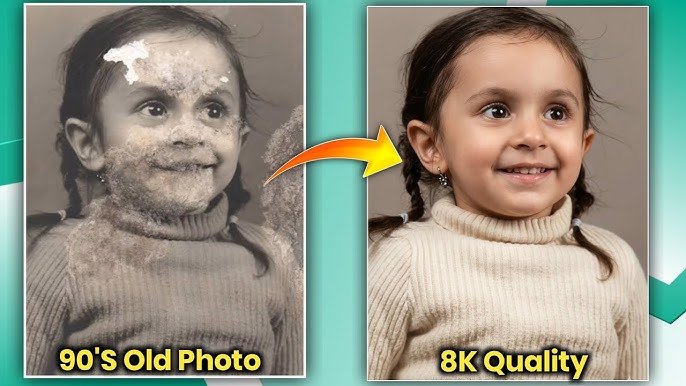
Imagine snapping a quick phone photo of a breathtaking landscape or digging up an old family picture—only to find it looks soft, blurry, or pixelated when you zoom in. Now picture the same image transformed into razor-sharp 8K detail, with every texture, edge, and color popping vividly. That’s exactly what modern AI image upscaling delivers.
In this guide, you’ll learn what it really means to turn any image into 8K quality, why it works so well, the best safe tools available today, and practical tips to get professional results every time. Whether you’re a photographer, designer, e-commerce seller, or just someone who wants crystal-clear memories, this process is simpler than you think.
What Is AI Image Upscaling to 8K Quality?
AI image upscaling, also known as super-resolution, uses advanced artificial intelligence to intelligently increase an image’s resolution—often up to 8K (7680 × 4320 pixels) or even higher—while adding realistic details instead of just stretching pixels.
Traditional resizing makes images look blurry because it simply enlarges existing pixels. AI models, trained on millions of high-quality images, analyze patterns, textures, and edges to reconstruct missing information. The result? Sharper photos, clearer text, and more vibrant colors without the usual artifacts.
This technology has become incredibly accessible in 2026, with free and paid online tools that require nothing more than uploading a photo and clicking a button.
Key Features and Benefits of 8K Image Enhancement
Turning everyday images into 8K quality offers real advantages that go far beyond “bigger files.” Here are the standout benefits:
- Crystal-clear detail recovery — AI restores fine textures like fabric weaves, hair strands, or leaf patterns that low-resolution originals lose.
- Print-ready results — Upscaled images hold up beautifully for large posters, canvases, or photo books at 300 DPI without looking soft.
- Better performance across devices — 8K files shine on high-resolution screens, social media previews, and e-commerce product pages.
- Versatile use cases — Perfect for restoring old family photos, enhancing product shots for online stores, polishing AI-generated art, or preparing images for professional presentations.
- Time and cost savings — No need for expensive cameras or studio reshoots; one click can revive existing images.
For example, a small 720p product photo can become a stunning 8K asset that makes your online store look premium and trustworthy. Or that faded childhood picture? It can feel brand new again.
Best Tools to Turn Any Image into 8K Quality
Several legitimate, user-friendly AI tools make 8K upscaling straightforward and effective. Here are some of the top safe options available in 2026:
1. Krea.ai Image Enhancer
This free online tool excels at sharpening details and pushing images up to full 8K resolution. Simply upload your photo, and its AI handles noise reduction and clarity boosts automatically. Ideal for quick enhancements on portraits, landscapes, or creative work.
2. LetsEnhance.io
A powerful choice for professional results, it supports up to 16x enlargement (easily reaching 8K and beyond) with specialized modes for photos, AI art, or old images. Drag-and-drop your file, select your upscale factor, and download print-ready files—great for e-commerce or large-format printing.
3. Media.io AI Image Upscaler
User-friendly with 2x, 4x, or 8x options and extra features like portrait sharpening or old-photo restoration. It preserves original quality while enlarging, making it perfect for beginners or mixed-use projects like social media and real estate listings.
4. Canva Image Upscaler
Integrated directly into Canva’s editor, this tool offers 2x to 16x upscaling with one click. If you already use Canva for designs, it’s the most seamless option—no extra logins required.
5. Topaz Labs Free AI Image Upscaler
Known for high-quality results, their online tool (and desktop version) delivers natural-looking enhancements up to 8x. Excellent for photographers who want precise control without over-sharpening.
All these tools are browser-based or simple apps—no risky downloads or modifications needed. Start with free tiers to test what works best for your images.
Pros and Cons of AI Image Upscaling
Like any technology, AI upscaling has strengths and limitations:
Pros
- Extremely fast—results in seconds
- Adds realistic details instead of blurring
- Works on almost any image type (photos, art, screenshots)
- Continuously improving with new AI models
- Accessible for free or low cost
Cons
- Best results come from decent starting images (extremely blurry or tiny files may still show some limitations)
- Can occasionally invent minor details in very low-quality originals
- Higher resolutions create larger file sizes that need good storage or compression
- Some advanced features require a paid plan for unlimited use
Overall, the pros far outweigh the cons for most everyday and professional needs.
Practical Tips and Best Practices for Stunning Results
To get the most out of any 8K upscaler, follow these simple guidelines:
- Start with the best original possible — Higher starting quality always produces superior 8K results. Avoid heavily compressed files if you can.
- Match the tool to your image type — Use portrait modes for people, gentle enlargement for text-heavy graphics, or restoration modes for vintage photos.
- Test different upscale factors — Not every image needs full 8K; sometimes 4x gives the perfect balance of quality and file size.
- Check before downloading — Preview the result and zoom in to catch any minor artifacts you can fix with a second pass or light editing.
- Batch process when possible — Many tools let you upscale multiple images at once, saving time for projects like product catalogs.
- Use for the right purpose — 8K shines for prints, large displays, or archival storage; compress slightly for web use to keep load times fast.
Real-life example: A freelance designer recently took a 1-megapixel client logo, upscaled it 8x with LetsEnhance, and turned it into crisp billboard-ready artwork—clients were amazed at the transformation.
Prompt here 👇
Enhance the portrait while strictly preserving

the subject's identity with accurate facial geometry.

Do not change their expression or face shape. Only

allow subtle feature cleanup without altering who they are.

Keep the exact same background from the reference image. No replacements, no changes, no new objects, no layout shifts. The environment must look identical.

The image must be recreated as if it was shot on a Sony Al, using an 85mm f1.4 lens, at fl.6, ISO 100, 1/200 shutter speed, cinematic shallow depth of field, perfect facial focus, and an editorial-neutral color profile.

This Sony A1 + 85mm f1.4 setup is mandatory. The final image must clearly look like premium full-frame Sony Al quality. Lighting must match the exact direction, angle, and mood of the reference photo.

Upgrade the lighting into a cinematic, subject-focused style: soft directional light, warm highlights, cool shadows, deeper contrast, expanded dynamic range, micro-contrast boost, smooth gradations, and zero harsh shadows.

Maintain neutral premium color tone, cinematic contrast curve, natural saturation, real skin texture (not plastic), and subtle film grain. No fake glow, no runway lighting, no oversmoothing.

Render in 4K resolution, 10-bit color, cinematic editorial style premium clarity, portrait crop, and keep the original environmental vibe untouched.

Re-render the subject with improved realism, depth, texture, and lighting while keeping identity and background fully preserved.

NEGATIVE INSTRUCTIONS:

No new background.

No background change.

No overly dramatic lighting.

No face morphing.

No fake glow.

No flat lighting.
FAQs
How does AI actually create 8K quality from a small image?
AI uses super-resolution models trained on vast datasets to intelligently predict and fill in missing pixel data, reconstructing realistic textures rather than simply enlarging what’s already there.
Is turning images into 8K quality free?
Yes—many tools offer generous free tiers. For heavier or professional use, affordable paid plans unlock unlimited processing and higher resolutions.
Will upscaling work on old or blurry photos?
Absolutely. Tools with restoration modes are designed specifically for damaged, low-resolution, or vintage images and often produce dramatic improvements.
Can I use 8K upscaled images for commercial projects?
Yes, outputs from reputable tools are generally safe for personal and commercial use (always check the specific tool’s terms for confirmation).
Does upscaling change the original image style?
High-quality AI tools aim to preserve the original look and feel while enhancing clarity. Results stay natural rather than overly artificial.
Conclusion
Unlocking stunning clarity by turning any image into 8K quality is now easier and more powerful than ever. With the right AI tools, a few clicks, and these practical tips, you can elevate everyday photos into professional-grade visuals ready for prints, websites, or creative projects.
Ready to see the difference for yourself? Explore these innovative AI upscalers today and transform your images with breathtaking clarity. Your photos will thank you.