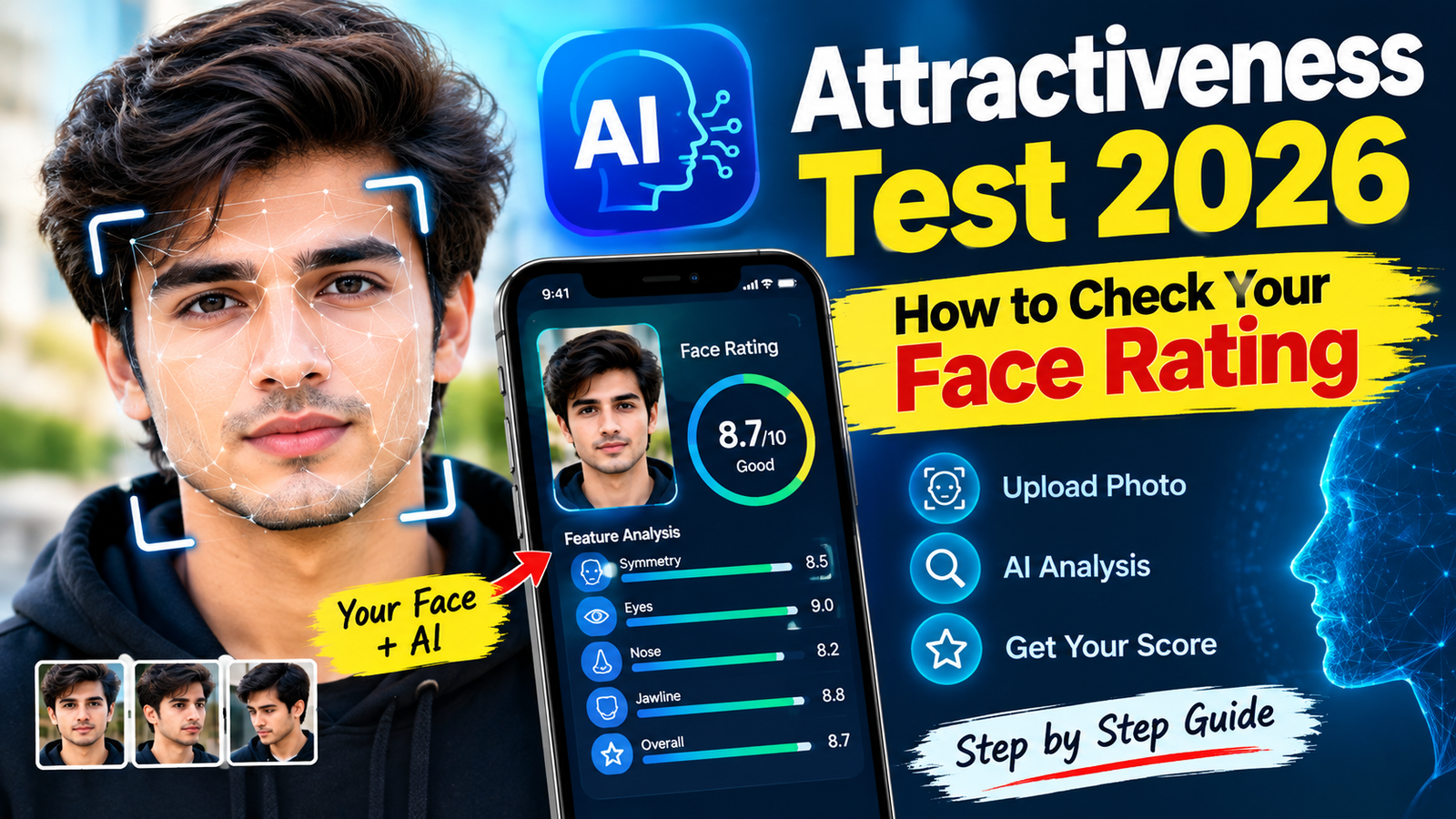

AI Attractiveness Tests have become a popular way to explore how artificial intelligence analyzes a person’s facial features from a photograph. These tools can examine visible characteristics such as facial symmetry, proportions, feature alignment, and image quality before producing a face rating or score.
If you want to try an AI face rating test in 2026, the process is usually simple. You upload a suitable photo, allow the system to analyze the visible facial features, and receive a result based on the tool’s own scoring method.
However, an AI-generated score should be treated as an automated analysis of one photograph, not as an objective measurement of someone’s beauty or personal value.
What Is an AI Attractiveness Test?
An AI Attractiveness Test is an online tool that uses computer vision or machine-learning techniques to analyze a facial photograph.
Depending on the service, the analysis may consider factors such as:
- Facial symmetry
- Face proportions
- Relative feature positioning
- Jawline and facial contours
- Eye and eyebrow positioning
- Overall facial structure
- Photo lighting and clarity
Some services provide a numerical score, while others provide a percentage, category, or written analysis.
The exact scoring system can be different from one AI tool to another, so two services may give different results for the same photograph.
How Does AI Face Rating Work?
Most AI face-rating systems start by detecting the face in an uploaded image.
The system may identify important facial landmarks around areas such as the eyes, nose, mouth, cheeks, jaw and overall face outline. It can then compare these measurements with the criteria used by its particular model.
A simplified process looks like this:
Upload Photo → Face Detection → Feature Analysis → AI Processing → Face Rating
The result is generated by the software’s model and should not be interpreted as a scientific or universal beauty standard.
How to Check Your Face Rating with AI
The basic process is straightforward.
Step 1: Choose a Clear Photo
Start with a high-quality photograph where your face is clearly visible.
For a better technical analysis, choose a photo with:
- Good lighting
- A clear face
- Minimal blur
- No heavy filters
- No sunglasses
- No objects covering your face
- A relatively neutral expression
A front-facing photograph is often easier for computer-vision systems to analyze because the main facial features are visible.
Step 2: Open an AI Face Rating Tool
Choose an AI attractiveness or face-analysis service that clearly explains what it does and how it handles uploaded images.
Before uploading your photograph, check its privacy information.
Look for details such as:
- Whether images are stored
- How long images are retained
- Whether photos are used for model training
- Whether you can delete uploaded images
- Whether the service shares information with third parties
Avoid uploading photographs to services that provide unclear information about how personal images are handled.
Step 3: Upload Your Photograph
Use the upload button provided by the service and select your photograph.
Some platforms may support JPG, PNG or other common image formats. Follow the specific requirements shown by the website or application.
If the service asks for unnecessary personal information, consider whether that information is actually required for the face analysis.
Step 4: Start the Analysis
After uploading the image, look for an option such as Analyze, Rate My Face, Start Test, or a similar button.
The AI system will process the photograph and identify the visible facial features supported by its model.
The processing time can vary depending on the service and the size of the image.
Step 5: Review Your Face Rating
Once the analysis is complete, the service may show a numerical rating or other type of result.
For example, a platform might provide:
- Overall face score
- Symmetry analysis
- Facial proportion information
- Individual feature observations
- Percentage-based results
- Written feedback
Remember that these results depend on the particular AI model and its criteria.
How to Get a More Consistent AI Face Rating
If you want to compare results between different photographs, keep the conditions as similar as possible.
Use Similar Lighting
Lighting can dramatically change how facial features appear.
Harsh shadows may make some facial areas appear different, while soft, even lighting can provide the system with a clearer image.
Try to use natural or evenly distributed lighting.
Keep the Camera at Eye Level
Hold the camera approximately at eye level rather than shooting from an extreme high or low angle.
A significantly different camera angle can change the apparent proportions of your face.
Avoid Extreme Expressions
If you are comparing multiple photographs, use similar facial expressions.
A large smile, raised eyebrows, or a different head position can change the appearance of facial features.
Avoid Heavy Filters
Beauty filters can modify facial proportions, skin texture, eyes, jawline and other visible features.
If you want to understand how the AI responds to your actual photograph, use an unfiltered image.
Keep Your Face Visible
Do not cover important facial features with:
- Sunglasses
- Masks
- Hands
- Large accessories
- Hair covering most of the face
A clear photograph gives the system more usable visual information.
Why Can Your AI Face Score Change?
It is normal for an AI rating to change between photographs.
The reason is that the AI is analyzing the image, not some permanent numerical value attached to you.
Differences can result from:
- Camera distance
- Lens characteristics
- Lighting
- Head position
- Facial expression
- Image resolution
- Shadows
- Image compression
- Filters
- Face visibility
For example, the same person may receive different results from a close-up selfie and a properly lit portrait.
Therefore, comparing scores from completely different photographs may not be meaningful.
Should You Trust an AI Attractiveness Score?
An AI face score should be treated as entertainment or automated image analysis, rather than an objective judgment.
Attractiveness is influenced by many factors that a simple photograph cannot completely represent. Personal preferences, cultural differences, expressions, personality, presentation and context can all affect how people perceive someone.
AI models can also reflect the data and assumptions used to develop them.
For this reason, a score such as “82” or “91” should not be interpreted as a definitive measurement of your attractiveness.
It simply represents what that particular system produced from that particular photograph.
AI Face Rating vs. Human Opinion
AI analysis and human perception are different.
An AI system can measure or estimate certain visible characteristics from an image, while humans interpret faces within a much broader social and cultural context.
This means an AI result may disagree with people’s opinions.
There is no requirement for an AI-generated score to match how friends, family members, photographers, or other people perceive the same person.
The difference does not necessarily mean that one result is universally correct.
How to Protect Your Privacy When Using Face AI
Your face is personal biometric-related information, so privacy deserves attention when using online facial-analysis services.
Before uploading a photograph:
Check the Privacy Policy
Find out how the service handles uploaded images and whether they are retained.
Avoid Unnecessary Personal Details
A face-rating service generally should not need sensitive information unrelated to the analysis.
Be cautious if a service requests unnecessary identity, financial or account information.
Don’t Upload Someone Else’s Photo Without Permission
Do not upload another person’s private photograph to an AI service without appropriate permission.
Be Careful With Public Sharing
Think twice before publishing your complete AI analysis and original photograph publicly, especially if the image contains personal information.
Delete Your Data When Possible
If the service provides an option to remove uploaded photographs or account data, use the available privacy controls when you no longer need them.
Common Problems With AI Attractiveness Tests
AI face-rating tools can produce inconsistent or unusual results.
Poor Image Quality
A blurry or low-resolution photograph can make facial detection less reliable.
Extreme Lighting
Strong shadows can hide important facial features.
Unusual Camera Angles
A tilted or extreme-angle photograph may change apparent facial proportions.
Multiple Faces
Some systems may struggle when more than one person appears in the photograph.
Filters and Editing
Edited images may produce results that do not represent the original appearance.
Different AI Models
Different services use different models and scoring criteria, so their ratings should not be directly compared as if they were using the same scale.
How to Compare Two Photos Using AI
If your goal is to see how different photographs are analyzed, use a controlled comparison.
Take two photographs under similar conditions.
For example:
Photo A: Natural lighting, eye-level camera, neutral expression.
Photo B: Same lighting, camera position and expression, but a slightly different composition.
Run both through the same AI service.
Then compare the results.
This is more useful than comparing a professional portrait with a dark, low-quality selfie.
What Makes a Good Photo for AI Face Analysis?
A suitable test photograph should generally have:
- Clear facial visibility
- Even lighting
- Reasonable resolution
- Minimal image compression
- Neutral background
- No extreme camera angle
- No heavy beauty filters
- Only one clearly visible face
The goal is not to make yourself look better. The goal is to provide the AI with a consistent and readable image.
Can AI Improve Your Face Rating?
Some services may provide suggestions based on the photograph, such as improving lighting, camera angle or image composition.
These suggestions should be understood as photo-presentation advice, not instructions for changing your physical appearance.
If your score changes after better lighting or a different camera angle, that may simply mean the AI interpreted the new photograph differently.
You should not feel pressured to change your natural appearance because of an automated score.
AI Attractiveness Test 2026: Safe Usage Tips
Before using any face-rating service, remember these basic rules:
- Use a photograph you are comfortable uploading.
- Read the service’s privacy information.
- Avoid unnecessary personal information.
- Don’t upload private photographs of other people without permission.
- Don’t treat an AI score as a scientific measurement of personal worth.
- Compare photographs under similar conditions.
- Be cautious about websites making unrealistic claims.
- Avoid services that request unnecessary payment or sensitive account information.
- Remove uploaded data when privacy controls allow it.
Final Thoughts
An AI Attractiveness Test in 2026 can be an interesting way to explore how computer vision analyzes a photograph. Most tests follow a simple process: upload a clear image, let the AI detect and analyze visible facial features, and review the resulting score or feedback.
For the most consistent results, use a clear, well-lit photograph with a straightforward camera angle and minimal editing. If you compare multiple photos, keep the lighting, expression and camera position as similar as possible.
Most importantly, remember that an AI face rating is only the output of a particular model analyzing a particular image. It is not a universal measurement of attractiveness, and a different photograph or AI system can produce a different result.
Use these tools for photo analysis, experimentation, and entertainment, while keeping your privacy and personal well-being in mind.